AI in CRM and sales
Reps copy facts between calls, chats and deal cards.
Summaries, scoring, proposal/email drafts and auto-tasks in Bitrix24 / amoCRM — less manual entry.
Performer: Павел Стасиньский
A commercial landing and expert guide in one: what to buy, which processes to cover, how an assistant differs from an agent, how deployment works, architecture, security, cases and budget ranges — without five near-identical SEO pages.
The query “AI for business” is mixed intent: some want a guide, some a tool, some an integrator. This page is a hybrid: commercial offer + expert guide + numbered case studies.
Bober AI Systems deploys AI into company workflows: CRM, documents, knowledge base, sales and analytics. We don’t sell a “neural net box” and we don’t spawn five near-identical landings for synonyms — one strong page per cluster, separate URLs only for distinct intent.
The six scenarios below end in a technical outcome, not a slogan. Next: assistant vs agent vs plain automation, deployment stages, architecture (Yandex Cloud, Selectel, on-prem, Kubernetes), security and budget ranges.
Security is default: roles and access, audit logs, personal-data handling, prompt-injection defenses, private contour on request. NDA before kickoff is standard.
Not slogans — technical outcomes at the process/system boundary.
Reps copy facts between calls, chats and deal cards.
Summaries, scoring, proposal/email drafts and auto-tasks in Bitrix24 / amoCRM — less manual entry.
PDFs and scans are handled by hand; errors hit ERP and payments.
OCR + field extraction + CRM/ERP routing with validation and logs.
Answers from memory and outdated policies in chats.
Knowledge-base search with source citations — for support and internal FAQ.
Queues grow; L1 burns time on repetitive cases.
Classification, draft replies, human escalation by SLA rules.
Notes live in notebooks — CRM stays empty.
Transcript → summary → tasks and deal fields without a manual protocol.
Friday Excel exports instead of live signals.
Auto metrics on funnel and touch quality — same-day alerts for managers.
One query cluster — three different products. Choose by job, not by hype.
You need help for a human: find, draft, explain.
Chat/widget with knowledge access and drafts. CRM actions only via a human or strict templates.
You need system actions without copy-paste at every step.
Tools: update a deal, create a task, send email, escalate. Roles, limits and HITL on critical paths are mandatory.
The process is repeatable and rules are known — an LLM is overkill.
Workflows, CRM robots, integrations and queues. Add AI later if unstructured input appears.
30–60 minutes: bottleneck, systems, manual volume, data risk. Decide if AI is needed or rules and integrations are enough.
Narrow prototype on real data: validate answer/extraction quality before a full pilot estimate.
2–4 weeks on one process with KPIs: cycle time, automation share, quality, team load.
Integrations, queues, monitoring, roles, runbook. Deploy in your contour: RU cloud or on-prem.
Training, handover, optional SLA: scenario iterations and model-quality drift control.
from ~€1,500
process audit and integration map · ~10 days
from ~€3,000
pilot on one scenario · 2–4 weeks
from ~€5,000
turnkey production · from 4 weeks
| Price | from €1,500 |
|---|---|
| Timeline | 28 days |
| Format | Fixed estimate · remote delivery |
| Scope | Hybrid commercial landing and guide: scenarios, assistant vs agent, architecture (Yandex Cloud / Selectel / on-prem), security, cases. Fixed estimate, NDA. |
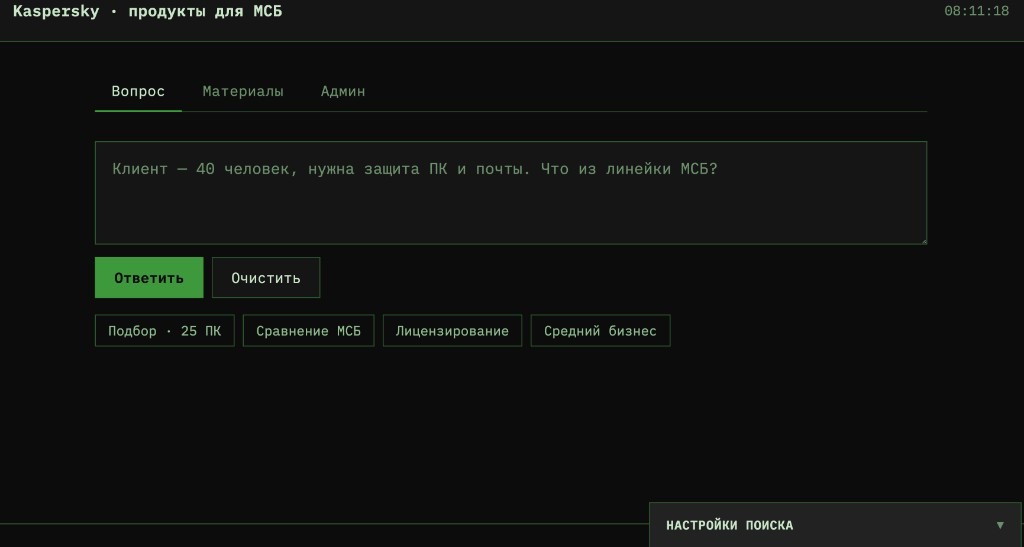
up to −50% repeat product questions
On a pilot group of 1C staff, per the client’s internal assessment
1C staff get product answers faster, ask fewer repeat questions and spend less time on long manual knowledge-base searches.
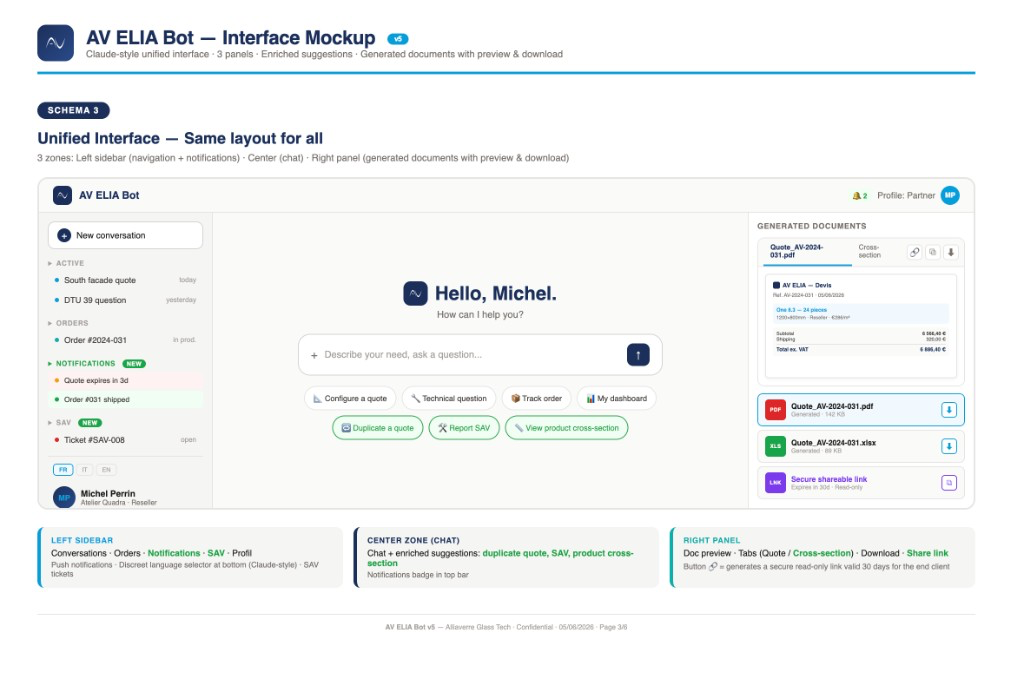
+32% quote→order conversion
Per client data for the first 4 months after launch
15 workspaces with no data crossover. 87% of tech requests via automation, −40% SAV load; quote→order conversion +32% per client data for the first 4 months. Payback on a ~4-month horizon at recurring volume.
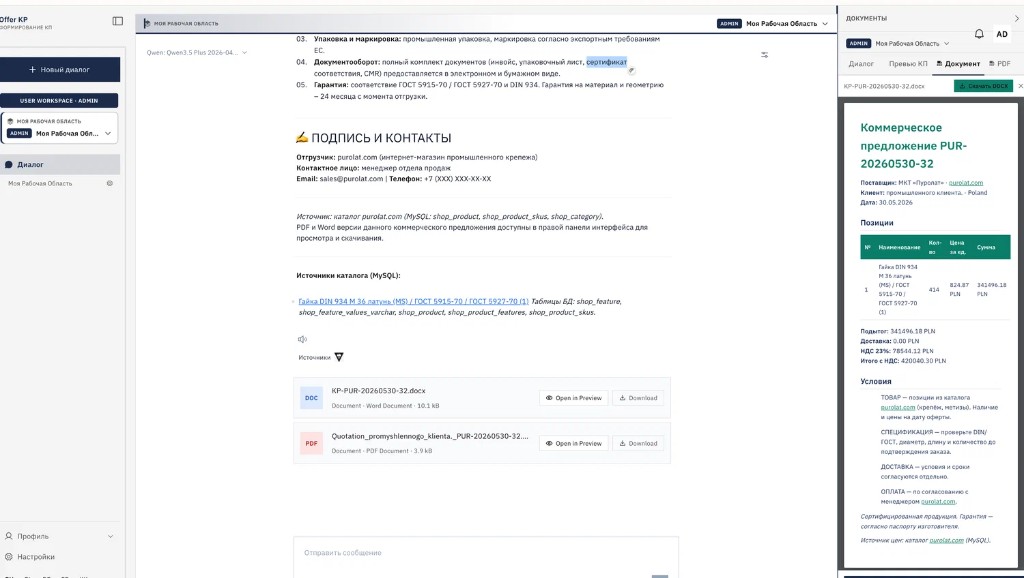
45 min → 2–5 min per proposal
From the client’s pilot process on typical PDF requests
A typical proposal is assembled in 2–5 minutes instead of ~45. Prices and SKUs only from the catalog — no invented line items. Table, VAT, terms and DOCX/PDF download.
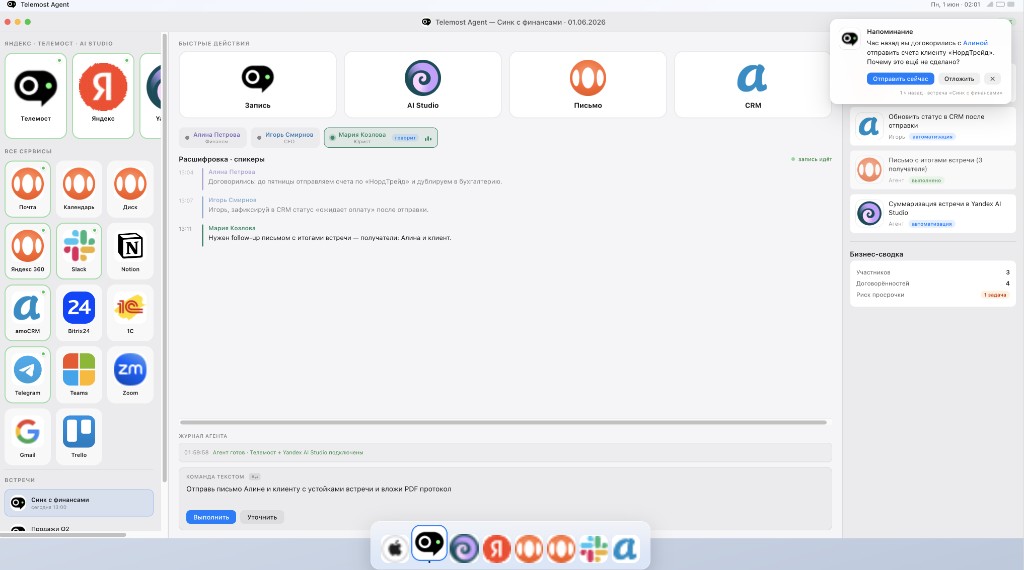
Automatic meeting summaries in CRM
Teams save time, process meeting outcomes faster, retain agreements and improve client follow-through and sales quality.

−50% repeat tickets, faster onboarding for new agents.
Public feedback from Yandex Services — same performer profile as the feed.
“Невероятный специалист. Откликнулся сразу, на протяжении всего процесса был на связи, работа выполнена качественно в минимальные сроки.”
“Павел — ас своего дела! Всё на высшем уровне, всегда на связи, оперативно отвечал на вопросы. Чувствовалось, что ему важен результат.”
A commercial landing and expert guide in one: what to buy, which processes to cover, how an assistant differs from an agent, how deployment works, architecture, security, cases and budget ranges — without five near-identical SEO pages.